
November 2, 2026

Est 11 min
Discover what the WCAG accessibility guidelines are, why they should be on your organisation’s radar, and how upcoming changes could impact you.
The digital accessibility landscape is constantly evolving, and with it, there is a succession of new legislation and global standards to keep up with.
It can feel overwhelming for organisations and individuals alike, especially when there is so much information to understand and technical language is not one of your strong points.
One standard we should all focus our attention on, however, is the Web Content Accessibility Guidelines (WCAG).
Not only do they provide an internationally recognised standard for making digital content accessible; they are also key to complying with equality laws in the UK and beyond.
This guide explains everything you need to know, and rest assured, you can leave the technical dictionary to hold up that wobbly table leg.

What are the WCAG accessibility guidelines?
WCAG is a set of guidelines designed to help you make sure your websites, apps and other digital content provide an intuitive, inclusive user experience for people with disabilities and additional access needs, including people who:
- Change the way a website looks in their browser to make it easier to use
- Use a keyboard instead of a mouse to navigate a website
- Use a screen reader to navigate and listen to website content
- Use an electronic braille display to access written information
- Use a screen magnifier to increase the size of on-screen content
- Use speech recognition to navigate websites and enter text using voice commands
Although WCAG is not enforceable, it underpins many accessibility and equality laws around the world.
That means following the guidelines is an important step for organisations looking to meet legal obligations both nationally and internationally.
Not to mention creating more inclusive digital experiences.

Who developed the Web Content Accessibility Guidelines?
The World Wide Web Consortium (W3C) is the main international body responsible for developing and maintaining web standards.
Its work supports the long-term growth of the internet through protocols and guidelines that are widely recognised and adopted.
One of its most significant achievements was undoubtedly developing WCAG.
The guidelines are updated collaboratively, with input from disability advocacy organisations, government agencies, accessibility specialists and, above all, people with lived experience.

A short history of WCAG
As technology advances and people’s digital access needs evolve, the W3C regularly updates WCAG to address new challenges.
Let’s go back to 1999, when it all began:
May 1999 – WCAG 1.0: The first version focused on HTML content and introduced 14 guidelines, along with the A, AA and AAA conformance levels we have become familiar with.
- Level A covers the most critical accessibility barriers. Examples include missing alternative text for images and poorly labelled form fields. Whilst achieving Level A is a positive first step, it is not recommended as a baseline because significant barriers remain for users.
- Level AA is the widely accepted industry standard. It builds on Level A, addressing more common issues such as insufficient colour contrast and unpredictable navigation.
- Level AAA is the highest level of conformance. It includes enhanced requirements, such as greater colour contrast, sign language for pre-recorded videos and audio transcripts. The W3C does not recommend aiming for AAA across an entire website, however, as it is not practical or achievable to apply some criteria across every type of content.
December 2008 – WCAG 2.0: This version expanded the guidelines to cover a wider range of digital technologies, rather than focusing mainly on HTML.
It also introduced the four POUR principles, which underpin the WCAG success criteria, and refined the conformance levels.
June 2018 – WCAG 2.1: This update addressed developments in digital content, in particular, the use of mobile devices and tablets. It introduced 17 new success criteria without overhauling the existing framework.
January 2021 – WCAG 3.0: The first working draft was published, signalling a new, broader approach to digital accessibility.
October 2023 – WCAG 2.2: This version added nine new success criteria to address barriers affecting people with low vision, mobility, hearing and cognitive disabilities, as well as other additional needs.
It was introduced to quickly tackle some of the emerging barriers from the Covid pandemic before the completion of WCAG 3.0.
WCAG 3.0 remains under development, and we’ll explore what its proposed changes could mean for organisations later in this guide.
What does the current WCAG standard look like?
WCAG 2.2 is the current W3C recommendation.
It contains 13 guidelines, which set out the main goals for making web content more accessible.
Each guideline has testable success criteria that help organisations assess whether those goals have been achieved.
WCAG 2.2 contains 86 success criteria, divided across three conformance levels: A, AA and AAA.
For example, Guideline 1.1, Text Alternatives, asks organisations to provide alternatives to non-text content so it can be presented in different ways, such as large print, braille, speech, symbols or plain language.
At Level A, organisations are required to provide users with a text alternative that conveys the same meaning and context as the non-text materials.
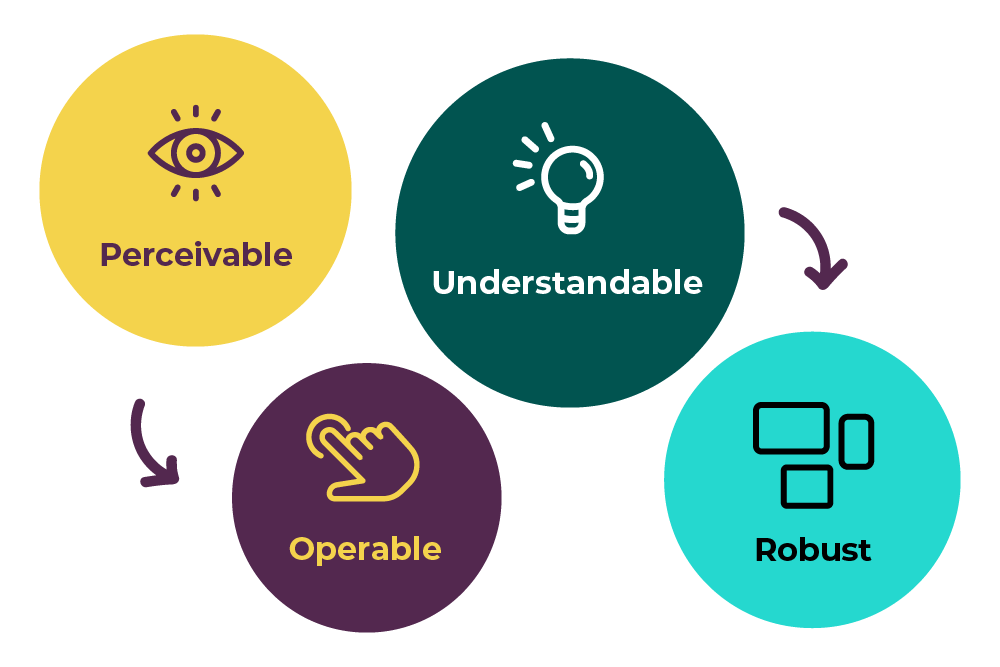
The guidelines are organised around four key principles, known as POUR:
- Perceivable: Users must be able to perceive the information and interface elements presented to them. For example, a blind person using a screen reader should be able to hear a description of a meaningful image.
- Operable: Users must be able to operate website controls and navigate the interface. For example, someone who uses only a keyboard should be able to move around a website and complete actions without needing a mouse.
- Understandable: Information and the way a website works must be easy to understand. For example, abbreviations should be explained when they first appear, such as Web Accessibility Initiative (WAI). Clear wording and consistent navigation also help users understand what to do next.
- Robust: Content must work reliably across different devices, browsers and assistive technologies, even as technology rapidly develops. For example, a link should be coded correctly so assistive technology can recognise it as a link and not a random sequence of numbers and letters.
Putting POUR into practice
We have tried to keep the language simple in this article, but what better way to show how WCAG relates to people’s experiences of exclusion than through a practical example?
Imagine you got this invite to the Passion4Social Festive party.
What barriers can you spot?
“You are invited to Passion4Social’s Annual Festive Gathering
In accordance with our ongoing commitment to facilitating opportunities for professional networking and social interaction among colleagues and our wider community, we are delighted to announce that our annual festive celebration will once again take place.
It will feature a buffet with seasonal produce, informal networking opportunities and activities intended to encourage engagement between attendees.
Please note that, due to venue availability, this year’s event will take place on Monday 7th December 2026, at 6.30 pm at the Crowne Plaza Hotel, 3 Congress Road, Glasgow.
Guests are advised to familiarise themselves with local transport arrangements before departure.
Evening dress is encouraged but is entirely optional, and refreshments will be provided subject to availability.
Capacity is limited, and it is important that you confirm your attendance no later than Friday 23 October, providing information regarding dietary requirements and access needs.
Other enquiries can be directed to the appropriate member of the organising team.
We look forward to an enjoyable and productive evening for all participants.”
Let’s see how you fared?
Well, the invitation uses long, complex sentences, and the date, venue and RSVP deadline are buried among a lot of unrelated information.
The tone is unnecessarily formal, which may put people off.
The language used, for example, could be plainer and more welcoming.
The text has poor colour contrast, and the accompanying image contains important details without alternative text, so some readers are excluded.

Who is required to comply with WCAG in the UK?
In the UK, there are multiple laws around digital accessibility which businesses and organisations must comply with, and they all use WCAG as their benchmark.
The Equality Act 2010, for example, protects people from disability discrimination and promotes a fairer, more equal society.
It says that both public and private sector businesses must provide equal access to goods, services and information.
That includes digital and applies to all businesses, big and small.
Further to that, the Public Sector Bodies (Websites and Mobile Applications) Accessibility Regulations 2018 set out very specific requirements for public sector websites and mobile apps.
The European Accessibility Act (EAA), which came into force last June, also introduced accessibility requirements for a range of digital products and services across the EU, and yes, it impacts the UK too.
Those of you who serve the European market and meet certain criteria must be compliant.
So, you can see that understanding which laws and standards apply to your organisation is an important first step towards meeting your responsibilities and making your services accessible.

Why does WCAG compliance matter to your organisation?
What happens if your website is not accessible, we hear you ask?
Legal action is one very hard-hitting consideration, but it’s just as important to think about the barriers your website might be creating for people.
There are an estimated 16.1 million disabled people in the UK alone, and the Click-Away Pound Survey reported that, in 2019, people abandoning retail websites because of accessibility barriers represented an estimated £17.1 billion in lost business.
An inaccessible website results in lost customers, frustrated users, and people being unable to access the information or services they need.
Now, think about the ways good accessibility positively impacts every user, not just disabled people.
Someone using captions to follow a video on a noisy train, or a worker using speech-to-text to write an email after spraining their wrist.
Many of us rely on accessibility features in everyday life, sometimes without even realising it.

WCAG 3.0 is coming: What does that mean for your organisation?
Although an initial delivery date of 2028 was anticipated, it may take several more years before the new guidelines become an official W3C recommendation.
So, why talk about it now?
The changes made during its development already give us an idea of the intended scope of the final guidelines.
There have also been noticeable differences between successive drafts already, including changes to terminology and the way conformance is structured.
Getting familiar with WCAG 3.0 now is a sensible way to prepare for the future.
Another reason to pay attention is the rapidly evolving digital landscape.
Advances are such that accessibility standards need to extend beyond traditional web pages and web content.
WCAG 3.0 is being developed with a broader scope, potentially covering:
- Augmented and virtual reality
- Digital content, including office documents, presentations and PDFs
- Authoring tools, such as Content Management Systems (CMS), including WordPress and Adobe Experience Manager
- User agents, including browsers and assistive technologies
- Software, including mobile apps
- Web applications, such as Google Docs and Office 365
- Operating systems

How do I make my website WCAG compliant?
The first thing to remember is that WCAG 3.0 won’t suddenly make WCAG 2.2 obsolete.
WCAG 2.2 will continue to be relevant, so if you are already working towards Level AA conformance, you are taking a positive step for both your users and your organisation.
Those of you who are already AA compliant have laid the first foundations for transitioning to 3.0.
The W3C website provides the guidelines and supporting resources, including material on understanding WCAG 2.2, meeting its requirements and using recommended techniques.
These resources are available to anyone involved in developing or maintaining digital content.
However, if you are unfamiliar with WCAG, knowing where to begin and how to apply the guidelines in everyday working practices can feel overwhelming.
That’s where our accessibility team can help.
At Passion4Social, we recognise that every organisation approaches accessibility differently.
To reflect these different needs, we’ve developed a package-based approach to accessibility auditing, supporting organisations to make progress in a way that feels achievable and sustainable.
From our Starter Accessibility Check, which is ideal for small organisations, CICs, charities and anyone with limited accessibility knowledge, to our Trailblazer Accessibility Check, which is suited to organisations with existing accessibility knowledge or initiatives that want to take the next step, there is something to suit your needs and budget.
If you are unsure where to start, our accessibility quiz is a useful first step.
You can also get in touch with our team to discuss which support package best suits your organisation.
Frequently asked questions
WCAG stands for Web Content Accessibility Guidelines.
These internationally recognised accessibility standards have been designed to support organisations and developers working to make websites, mobile applications, and digital content fully accessible and inclusive for individuals with disabilities and diverse access needs, ensuring a better user experience for everyone.
Achieving WCAG accessibility standards removes both visible and invisible barriers, empowering a greater number of people to navigate and use your digital services independently.
It significantly improves the overall user experience, minimises lost customers, and strongly supports true digital inclusion.
The four core principles of web accessibility are Perceivable, Operable, Understandable, and Robust (POUR).
Together, they help ensure that individuals with diverse abilities can seamlessly access, navigate, comprehend, and interact with digital content across a wide variety of devices and assistive technologies.
While WCAG itself is not legally binding legislation, it serves as the foundational benchmark and technical standard that underpins accessibility laws around the world.
For UK organisations, complying with these guidelines is essential for meeting key legal obligations set out by major frameworks such as the Equality Act 2010 and the Public Sector Bodies Accessibility Regulations 2018.
WCAG 2.2 currently serves as the official World Wide Web Consortium recommendation explored thoroughly throughout this guide.
It encompasses three distinct conformance levels, specifically A, AA, and AAA, with Level AA being widely recognised, accepted, and adopted as the standard recommended benchmark for digital accessibility.
Start by reviewing your website against WCAG 2.2 and identifying barriers, such as poor colour contrast, missing image descriptions or navigation that cannot be used with a keyboard.
You can do this through accessibility testing, either in-house or by contacting experienced testing outfits like Passion4Social, who offer tailored support.
Share via social media:


You may also like...

Website accessibility audits: How Passion4Social can help UK businesses
Discover how a website accessibility audit can help UK businesses...

What is an accessibility audit (and do you really need one)?
This article explores how accessibility audits identify digital barriers, why...

10 simple steps to writing accessible content
Learn how to make your content easier to find, understand,...

More accessibility, more green solutions
In this blog, we look at the ways accessibility drives...

We stopped looking at CVs; Look what we found instead
With summer in full swing, we recruited people with lived...

Teaching digital accessibility early: The future of inclusive education
In this article: Why accessibility should be integrated in education...
Accessibility beyond websites: The rise of accessible everything
In today’s blog, you will read about: How digital accessibility...

Accessible Content Does Not Need to Be Dull
Who says accessible content has to be boring? Some people...

Digital Accessibility in Action: The Platforms, Creators and Advocates Amplifying Disabled Voices
As we tell anyone who will listen, creating accessible digital...
What you need to know about WCAG 3.0
We will explore the key differences between WCAG 2 and WCAG 3.0, including the move...

Accessible images: The art of alt text
November 25, 2026 , 12 pm - 1 pm GMT

Overlays vs lived experience users: Shortcut or setback?
Explore the arguments for two powerful approaches to digital accessibility: the convenience of automated overlays...

When “Save as PDF” isn’t enough: Why accessible PDFs require knowledge, planning, testing and time
In this article, you will discover: Polished-looking PDFs are not...

Digital poverty: Its impact and strategies for the future
Explore the everyday reality of being left behind in a digital-first age, and reimagine a...

The EAA one year on: What has really changed?
In this blog, you will read about: What has really...

The sales you never got to see and why digital accessibility could be the reason
How sales can be lost without ever appearing in your...

When accessibility is an afterthought: Voting remains a postcode lottery for disabled voters
In this blog, you will discover: How accessible voting exists...

Quick wins: 10 accessibility fixes you can implement now
In some circles, digital accessibility has a bad reputation, but...

The European Accessibility Act
A practical guide to the European Accessibility Act, explaining what...
Considering diversity in cyber security: Designing inclusive systems for disabled and neurodivergent users
Cyber security is no longer something that works away unobtrusively...